Time Tracker · part of Amaal
End time-theft. Trust every hour on the timesheet.
Amaal’s desktop Time Tracker records the work your team actually does and turns it into honest timesheets, feeding attendance, flagging shortfalls, revealing what each project really costs, and showing you exactly what people are working on. And because it ignores idle time and catches auto-clickers and mouse jigglers, nobody can pad the clock.
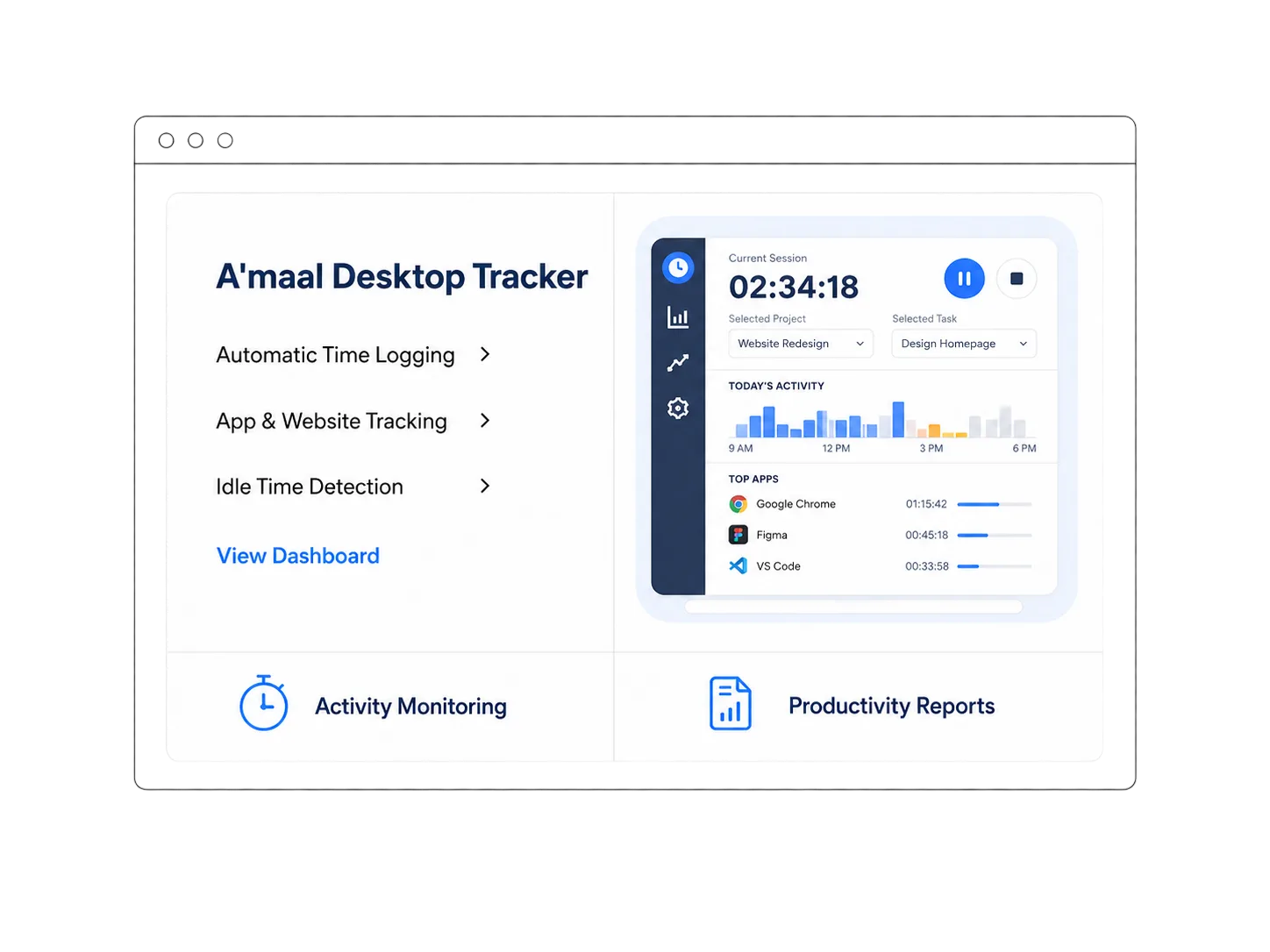
One timer, your whole operation
The timesheet is the truth everything else runs on.
The Time Tracker fills every timesheet automatically from what your team really does, and inside Amaal that one honest number drives attendance, payroll, and project profitability.
Timesheets fill themselves
No manual entry and no rounding up. Each person's timesheet is built automatically from the work they actually do, minute by minute.
See the work, not just the clock
Know what your team is actually working on.
The Time Tracker captures desktop screenshots at random moments through the day, unpredictable, so they can’t be staged. You get an honest window into what everyone is working on, without standing over anyone’s shoulder. Each screenshot is backed by minute-by-minute activity scores, so a quiet screen and a busy one tell their own story.
- Randomly-timed captures nobody can predict or prepare for
- Each screenshot carries a minute-by-minute activity breakdown
- Weighted scoring shown as Good / Fair / Low / Poor
- Only screenshot metadata is stored on the device, never raw image bytes
Visibility, not guesswork
Random screenshots plus per-minute activity, so you always know what the team is doing, and they know the hours are real.
And nobody can fake their hours
The oldest trick in remote work, caught automatically.
Some people try to look busy with auto-clickers, mouse jigglers, or key-repeat scripts. Amaal runs an activity-integrity engine that spots them and strips the faked minutes out of the timesheet, so the hours you pay for, and the attendance you act on, are real.
Detects the whole toolbox
Auto-clickers, mouse jigglers, key-repeaters, character-by-character typers, macro loops, and scheduled timer scripts.
Confidence scoring
Signals compound; when it's confident, the period's activity is zeroed, and merely-suspected periods are reduced, not erased.
Server-side by design
Analysis runs on Amaal's backend, not the desktop app, so a tech-savvy employee can't disable or reverse-engineer it.
Everyone upgrades at once
Detection improvements roll out to every organisation instantly, with no reinstall and no version drift.
How it spots faked activity
Humans are irregular. Bots can’t fake that.
Amaal reads the shape of typing and cursor behaviour: the variation, curves, pauses, and corrections a real hand makes and a script can’t reproduce.
Robotic cursor paths
Perfectly straight lines, fixed angles, and constant speed give away a script; real hands move in curves, with overshoot and correction.
Mouse jigglers
The tiny, too-regular micro-movements a jiggler makes to fake presence look nothing like genuine mouse work.
Typing bots
Character-by-character, even-interval keystrokes betray a scripted typer instead of a person thinking as they write.
Macro loops
Repeating key sequences and repetitive arrow-key navigation are flagged as automated, not real work.
Rhythm & variance
Statistical timing checks catch 'humanized' bots that add random delays, because randomness still can't reproduce a human rhythm.
Protected from false flags
High thresholds, multi-signal corroboration, and recognition of normal patterns (autocomplete, copy-paste, reading) protect honest staff.
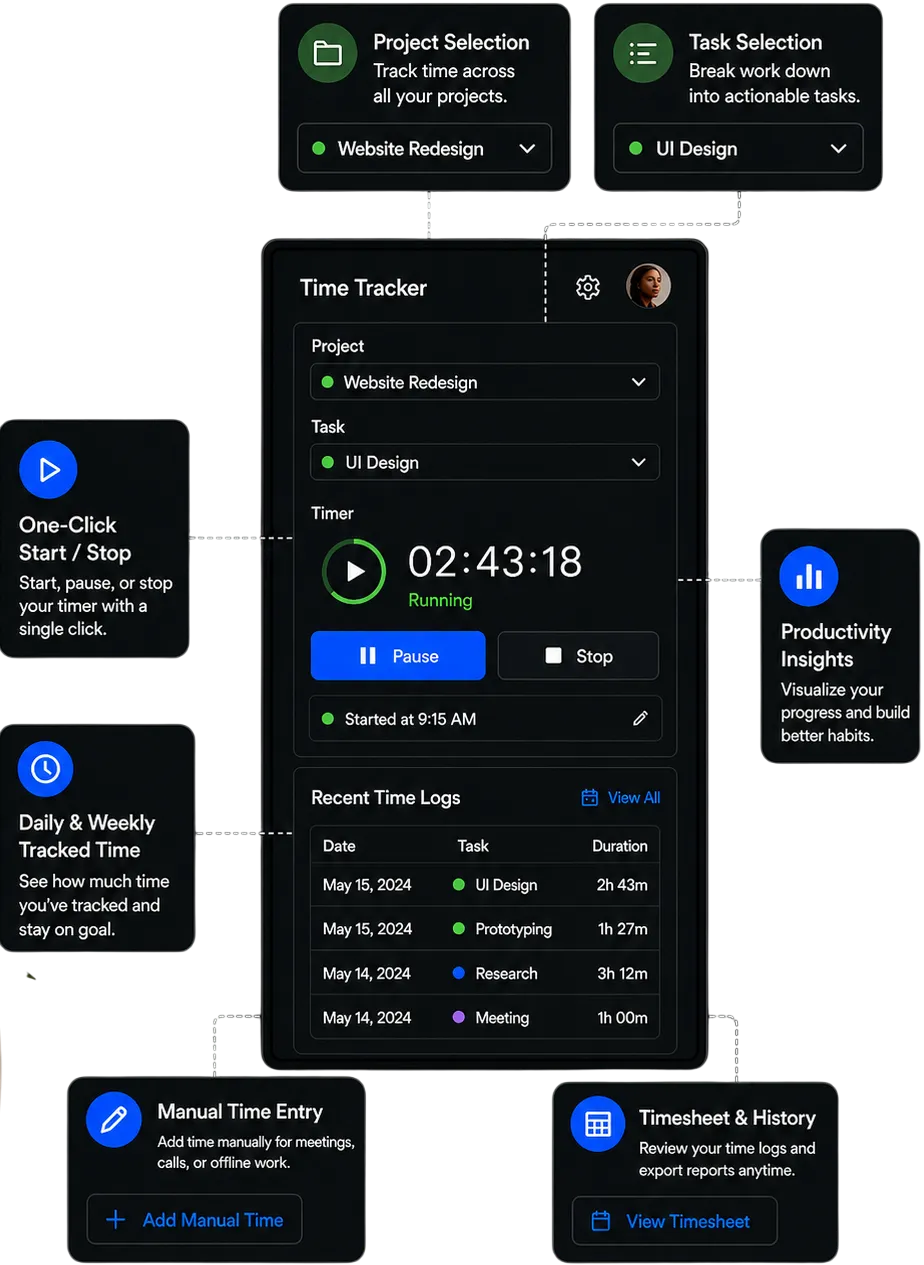
Simple for the team, honest for you
Pick a project, hit start, get to work.
Staff choose their project and task from the list, hit start, and get on with it, and the tracker does the rest. One-click start, pause, and stop, manual entry for meetings and offline work, and daily and weekly totals they and their manager can both see.
- Project & task selection
- One-click start / pause / stop
- Manual time entry
- Daily & weekly totals
- Recent time logs
- Timesheet & history export
Only real work counts
Honest by default, and it never loses a minute.
Idle time isn't paid time
Time away from the keyboard isn't counted as worked, so long coffee breaks don't quietly inflate the timesheet.
Restart reminders
Forgot to restart after a break? Escalating reminders survive reboots and clear the moment tracking resumes, so real hours aren't lost either.
Offline-first capture
Work is written to the device the moment it happens, so tracking keeps going with no internet and survives app reloads.
Self-healing sync
A background queue reconciles to the cloud when you're back online, setting aside a failing item instead of stalling everything.
Admin control & a defensible record
Levers for owners, evidence for every conversation.
Explainable flags
A 'suspicious patterns' view shows admins the exact reasons a period was discounted, for fair conversations rather than accusations.
Role-based access
A clear hierarchy of system owner, organisation admin, and tracked employee, so people see only what they should.
Full user lifecycle
Onboard, reset passwords, change roles, and instantly deactivate access, delegated per organisation.
Multi-organisation isolation
Groups and agencies keep each entity's data isolated, self-managed by its own admin.
Reporting & CSV export
Admins view activity and hours reporting and export it to CSV for payroll, review, and audits.
Part of Amaal, in Oman
One Omani system; your data never leaves Oman, built for the Personal Data Protection Law.
Runs everywhere your team does
A real desktop app, on every OS.
Windows, macOS & Linux
A real desktop app rather than a browser tab, so it can capture activity and screenshots reliably across your whole team, including Apple Silicon.
Signed & auto-updating
Code-signed, notarized installers pass Gatekeeper and SmartScreen, with in-app auto-update and managed rollout for larger teams.
Always up to date
Server-enforced version support keeps every client current, so an outdated app can't quietly sync bad data.
Everything in the Time Tracker
Time Tracker FAQ
Time Tracker: questions people ask
What is the Amaal Time Tracker?
Amaal Time Tracker is the desktop time-tracking module of Amaal, the small ERP for service businesses in Oman. It records what your team actually does on their computers, fills their timesheets automatically, turns those hours into attendance, costs every hour to a project, and captures random desktop screenshots, so owners can end employee time-theft and see exactly what people are working on, on Windows, macOS, and Linux.
How does the Amaal Time Tracker stop employees from stealing time?
Amaal Time Tracker only counts real work: it ignores idle time, captures unpredictable random screenshots, and runs a server-side integrity engine that detects auto-clickers, mouse jigglers, typing bots, and macro loops. When it is confident a period was faked it sets that period's activity to zero, and because the analysis runs on Amaal's backend rather than the desktop app, employees can't switch it off locally.
What happens if an employee's tracked hours fall short of their day?
In Amaal, tracked hours flow straight into attendance. When someone's hours fall short of their scheduled day, Amaal turns that shortfall into a penalty absence, so a person who clocks in but quietly under-works is flagged just like a no-show, and payroll reflects the hours actually worked.
How does the Amaal Time Tracker help with project profitability?
Because every tracked hour in Amaal is tied to a project and task, labour cost accrues to each project as the work happens. Owners see real cost and margin per project in Amaal, instead of discovering after delivery that a job lost money.
Can staff choose which project and task they're working on?
Yes. Coupled with Amaal Projects, staff select their project and task from a list before the timer starts, so every tracked hour is attributed to the right job automatically, and managers see where the team's time is really going.
What do the Amaal Time Tracker screenshots show, and how often?
Amaal Time Tracker captures desktop screenshots at random moments through the day. They are unpredictable, so they can't be staged, and they give owners an honest view of what staff are working on. Each screenshot is backed by minute-by-minute activity scores shown as Good, Fair, Low, or Poor, and only screenshot metadata is stored on the device.
Does the Amaal Time Tracker work offline?
Yes. Amaal Time Tracker is offline-first: it writes all activity to the device the moment it happens, so tracking continues with no internet and survives app reloads, then a self-healing background sync queue reconciles the data to the cloud once connectivity returns.
Is the Amaal Time Tracker private and compliant?
Amaal Time Tracker is part of Amaal, one Omani system, hosted in Oman and built for the Personal Data Protection Law. Activity data and screenshots are access-controlled by role and isolated per organisation, only screenshot metadata is kept on the device, and every flagged period comes with an explainable reason for a fair, defensible record.